
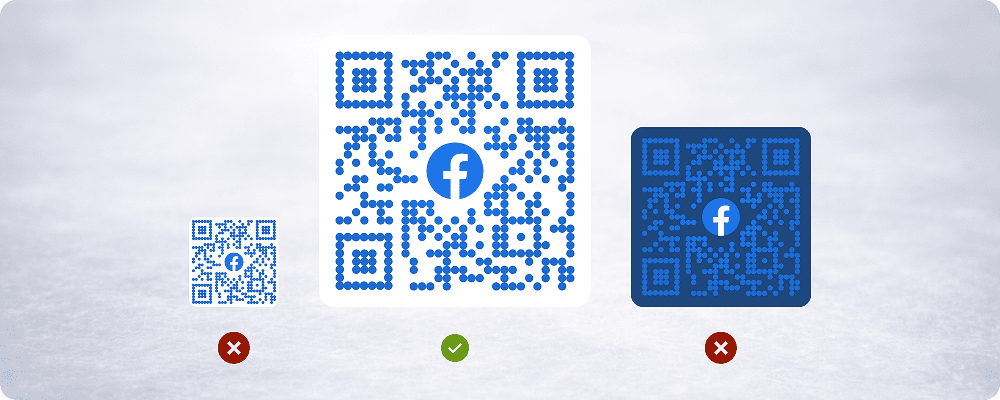
QR codes are only effective when they scan instantly and reliably. While generating a QR code is easy, ensuring it performs well in real-world conditions requires attention to design, placement, and context. Many businesses unknowingly make small mistakes that significantly reduce scan success and user engagement.
This guide breaks down the most common QR code mistakes and explains how to avoid them for consistently better scan performance across devices and environments.
Using Low-Quality or Blurry QR Codes
One of the most frequent issues is poor image quality. QR codes that are exported at low resolution, resized improperly, or compressed for web and print often lose clarity. Blurry edges, pixel distortion, and soft contrast make it difficult for camera sensors to detect the code accurately, especially in low light or at a distance.
To avoid this:
- Always export QR codes in high resolution.
- Use vector formats for print when possible.
- Avoid stretching or scaling after export.
- Test scans on multiple devices before final use.
Poor Color Contrast Between QR Code and Background
QR codes rely on contrast to be detected. Using similar colors for the code and background reduces scan reliability. Light-colored QR codes on light backgrounds or dark codes on textured surfaces often fail to scan, particularly in outdoor or uneven lighting conditions.
Best practices include:
- Dark QR code on a light background.
- Avoid gradients or busy textures behind the code.
- Maintain clear separation between foreground and background colors.
Placing QR Codes on Reflective or Glossy Surfaces
Glossy materials such as plastic, metal, or laminated prints can reflect light and create glare that blocks parts of the QR code. Even a well-designed QR code can become unreadable if reflections cover key areas.
To reduce glare issues:
- Use matte finishes for print.
- Adjust placement to avoid direct light exposure.
- Test scans under different lighting angles.
Making the QR Code Too Small
Size matters when it comes to scanning. QR codes that are too small require users to move closer, hold steady, or zoom in, increasing friction. This problem is common on packaging, flyers, or business cards where space is limited.
General size guidelines:
- Increase size for distance-based scanning.
- Ensure adequate quiet zone around the QR code.
- Test readability from the intended scan distance.
Ignoring the Quiet Zone
The quiet zone is the empty margin surrounding a QR code. Removing or reducing this space makes it harder for scanners to identify where the code begins and ends. Designs that crop QR codes tightly or place elements too close often lead to scan failures.
To avoid this mistake:
- Maintain the recommended quiet zone.
- Avoid placing text, icons, or borders near the edges.
- Keep surrounding space clean and uncluttered.
Over-Stylizing the QR Code
Custom QR designs can improve branding, but excessive styling often hurts functionality. Rounded modules, heavy patterns, or decorative overlays can confuse scanners, especially on older devices.
Safe customization tips:
- Keep core QR structure intact.
- Avoid extreme shape distortion.
- Test stylized codes extensively before deployment.
Poor Placement in Physical Environments
Even a perfect QR code will fail if placed poorly. Common placement issues include positioning too high or too low, angles that require awkward scanning, or locations with poor lighting or heavy shadows.
Effective placement means:
- Eye-level or natural viewing height.
- Flat or slightly angled surfaces.
- Adequate lighting without glare.
Linking to Slow or Non-Mobile-Friendly Pages
Scan performance does not end with detection. If the linked page loads slowly or is not optimized for mobile, users abandon quickly. This creates a poor experience even if the QR code scans correctly.
To improve post-scan performance:
- Use mobile-optimized landing pages.
- Minimize page load time.
- Avoid unnecessary redirects.
Not Testing Before Publishing
Many QR code issues are only discovered after printing or launching a campaign. Skipping real-world testing is a costly mistake.
Testing should include:
- Multiple devices and camera apps.
- Different lighting conditions.
- Real placement scenarios.
Conclusion
QR codes often represent the first interaction between a user and a brand. A failed scan creates friction, frustration, and lost opportunity.
By avoiding these common mistakes, businesses can ensure smoother scans, higher engagement, and better overall performance from their QR initiatives.